


Podcast Addict: Podcast player
4.669.93K Reviews
App Specs
- Version
- Varies with Device
- Updated On
- License
- Free
- Downloads
- 10,000,000+
- Developer
- Xavier Guillemane - Podcast & Radio Addict
- Categories
- Music & Audio
- Platform
- Android
Screenshots
 Analysis by AppCompare
I usually reach for a podcast player when I already know what I want to hear but don’t want to spend the day managing a queue. Podcast Addict is built for that sort of routine: find a show, keep up with its episodes, and shape playback around the time I have. It’s a free Android app in the music and audio category, developed by Xavier Guillemane - Podcast & Radio Addict. Its long-running presence is reflected in a 4.6 average from around 593,000 ratings, and it has passed 10 million installs. The app is rated Teen; optional in-app purchases range from $0.99 to $109.99 per item.
Begin with the shows you actually follow
My first useful step is to add a few familiar podcasts before browsing for more. That gives the home screen a purpose and makes it easier to see whether the app’s organization suits me. Podcast Addict supports a broad listening routine, but its strength is not simply having lots to browse: it gives listeners room to manage a growing collection rather than treating every episode as a one-off play.
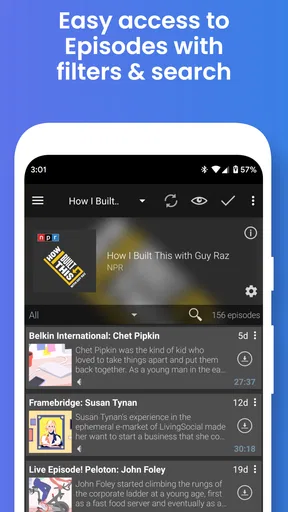
When I’m choosing a new show, search and discovery help me move from a topic to something worth trying. The published review describes filters for category, popularity, and language, as well as curated suggestions. I’d use those tools to narrow a broad interest—say, history or business—instead of scrolling through a large catalog without a plan. Suggestions can also nudge me toward subjects I hadn’t set out to explore, though I still prefer to sample a show before making it part of my regular queue.
Build a listening flow that fits the day
Once I’ve subscribed, the practical question is what to play next and how much control I want over the session. Playback speed is handy when a familiar host speaks slowly; skipping silences can make a long episode feel less meandering. I wouldn’t use either setting automatically for every show, since a faster pace can flatten an interview or make a careful explanation harder to follow. The useful part is being able to adapt playback to the episode rather than accepting one setting for everything.
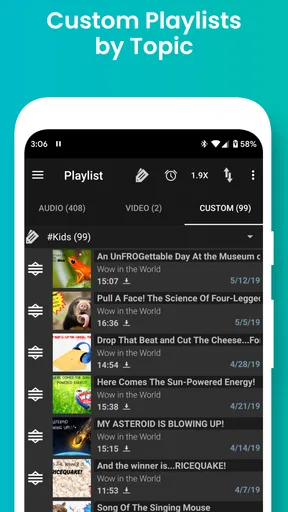
Playlists help when I want to plan ahead. For a commute, I can line up a few episodes instead of stopping to choose one at each break; for a workout, I can make a separate queue that doesn’t mix with the shows I save for quiet listening. The sleep timer serves a different moment: I can listen in bed without relying on myself to remember to pause. Chapter support is another small but meaningful convenience. If an episode has chapters, I can jump to a particular section, which is especially helpful when I’m revisiting a long conversation for one topic.
A realistic weekday use is straightforward: I check for new episodes before leaving, choose what fits the journey, and let the queue carry the session while I’m busy. If I have limited data or storage, automatic downloads need a little thought. The app’s per-podcast download settings let me be selective instead of treating every subscription the same. I’d keep downloads focused on the shows I reliably finish, then use streaming or manual choices for the ones I only sample. That small distinction can prevent a useful feature from turning into a storage-management chore.
Keep a library manageable
For listeners following several shows, categories and subscription management matter more than a flashy home screen. I like being able to group podcasts by how I use them—daily news, longer weekend listens, or programs I’m still trying—because it makes the next choice quicker. Automatic downloads can reduce routine tapping, but setting them for every show is not necessarily the best approach. A subscription that publishes often can fill a queue faster than I expect, so I’d review its individual settings rather than letting the default decide.
Worth Reading Before You Choose

EA SPORTS FC Mobile 26 Is a Bigger Football Game, but It Takes Time

Flipboard Shows What News Apps Must Do Beyond the Feed

Switching to Android Auto Means Rethinking Your Driving Routine

Google Calendar Makes a Crowded Week Easier to Manage

Ludo King Makes the Most of the Minutes Between Plans

Baby Panda World Brings Quick Play to Modern Phones, but Its Game Library Feels Busy
Backups are valuable at the moment people tend to forget about them: before changing phones or reinstalling. Being able to back up and restore subscriptions means the list I’ve built need not be recreated from memory. It is a practical handoff between devices, though it is worth treating a backup as part of occasional housekeeping rather than assuming every app change will preserve a carefully arranged setup without any action from me.
First Impressions and User Interface
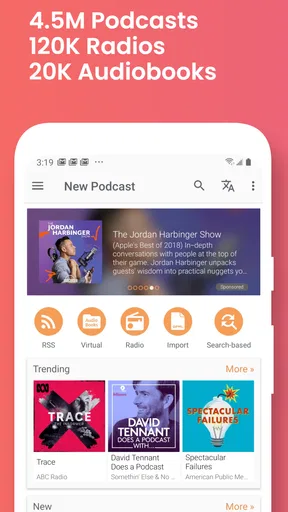
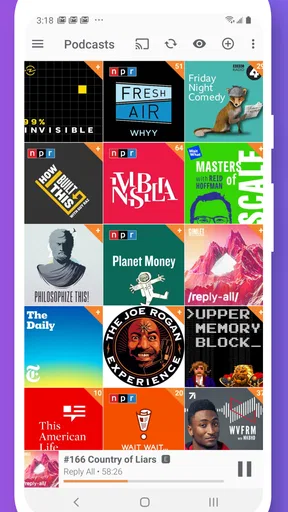
When I first launched Podcast Addict, I was greeted with a clean and intuitive interface. The main screen is straightforward, displaying your favorite podcasts and latest episodes right at your fingertips. It was super easy to navigate through the app, and I loved how everything felt where it should be. No need for a manual here, folks!
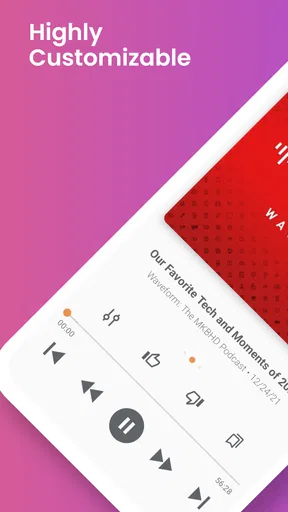
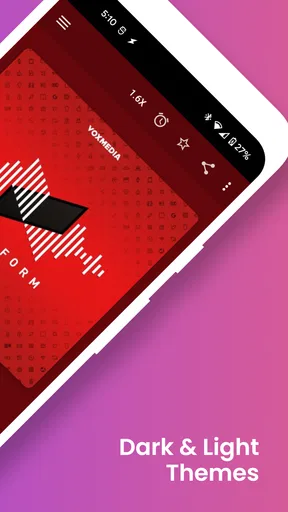
The app also allows for a great deal of customization, which is always a plus in my book. You can tweak the themes and layouts to suit your vibe, making the experience feel uniquely yours. It's like your very own podcast universe, customized to your liking.
Discovering New Content
One of the standout features is the discovery aspect. With over 2 million podcasts available, the app offers a vast library that caters to all interests. Whether you’re into true crime, comedy, or educational content, there’s something for everyone. The search function is robust, allowing you to filter results by category, popularity, or even language.
The app also includes curated lists and recommendations based on your listening habits. It's like having a personal podcast curator. I found myself diving into genres I hadn't explored before, all thanks to those nifty suggestions. Who knew I had a penchant for business podcasts?
Playback and Features
Playback quality is top-notch, and the controls are a dream. You can adjust playback speed, skip silences, and even set a sleep timer. The ability to create playlists is a game-changer, especially when you want to binge-listen during a long commute or workout session.
Another delightful feature is the chapter support, allowing you to jump to specific parts of an episode. This is particularly useful for those long interviews where you're only interested in certain segments. It's like having a podcast with a built-in table of contents.
Podcast Management
Managing your subscriptions is a breeze with Podcast Addict. The app allows you to automatically download new episodes and organize them into categories. You can set specific download settings for each podcast, which is perfect for managing storage space on your device.
There's also an option to backup and restore your subscriptions, so switching devices or reinstalling the app doesn't mean starting from scratch. It's the kind of thoughtful feature that makes you appreciate the developers’ attention to detail.
Community and Support
Podcast Addict has a vibrant community of users, and the developers are known for their responsiveness. There’s a feedback option within the app, and updates are frequent, ensuring that any bugs are swiftly addressed. It’s always reassuring to know that the app you’re using is continuously being improved.
In addition to community support, the app’s website has a comprehensive FAQ section, which is super helpful if you ever encounter any hiccups.
Choosing it over a simpler player
Compared with a basic player that focuses on a short queue and minimal setup, Podcast Addict makes more sense when I want subscriptions, categories, discovery, and playback adjustments in one place. That depth is a genuine advantage for someone who follows many shows or alternates between downloaded episodes and casual browsing. The trade-off is that extra control asks for a little attention: I may need to tune download choices, organize categories, and decide how I want recommendations to influence my listening.
If I only listen to one or two shows and want an app that makes every decision for me, a simpler player may feel more relaxing. Likewise, someone who wants the same listening setup across different platforms should compare available options on their own devices before settling in. Podcast Addict is specifically an Android app, so it is a better fit for a listener whose main podcast routine happens on Android than for someone seeking one identical experience everywhere.
Where the routine can snag
The main friction I’d watch for is not playback itself but the work around a large library. Automatic downloads are convenient until subscriptions accumulate, and a long list of new episodes can make choosing feel like another task. I’d start with only the shows I genuinely intend to follow, use categories that reflect real listening habits, and revisit subscriptions when a show no longer earns a place in the queue. That keeps discovery from turning into clutter.
Recommendations are useful as a starting point, not a substitute for judgment. A suggested show may match a broad interest without matching the tone or depth I want, so I’d listen to a sample before enabling downloads or building a playlist around it. Similarly, chapter navigation depends on an episode having chapters; when it does not, I simply use the normal playback controls. These are modest limitations, but knowing where a feature helps—and where it cannot—makes the workflow less frustrating.
The app is free to start using, while optional purchases are available in the app. I’d decide whether any paid option matters to my own routine only after using the basic player long enough to know what I’m missing. There’s no reason to spend just because a purchase is offered; the right question is whether a particular extra solves a problem I actually have. With a Teen content rating, it is also sensible for families to make listening choices with age-appropriate judgment rather than assuming every podcast is intended for every listener.
Who will get the most from it
I’d recommend it most readily to people who listen often, follow a mix of shows, and like deciding how episodes are downloaded, grouped, and played. A commuter can prepare a queue before leaving; someone doing chores can let selected episodes run without repeatedly searching; and a listener who dips into long interviews can use chapters when available to return to the relevant section. Those are different habits, but they all benefit from having more than a play button and a short recent-history list.
It is less compelling for someone who wants a tiny, hands-off setup or rarely listens to podcasts. In that case, the discovery and organization options may be more than the routine needs. I’d also be cautious about building an elaborate collection before knowing how I actually listen: a few well-chosen subscriptions and a simple category system are easier to maintain than a sprawling library that demands constant sorting.
Final Thoughts
After spending some quality time with Podcast Addict, I can confidently say it's one of the most comprehensive podcast players out there. Its user-friendly interface, extensive features, and vast content library make it a must-try for any podcast enthusiast.
If you're on the hunt for a reliable and feature-rich podcast player, give Podcast Addict a go. Who knows? It might just become your next app addiction.
Pros
- Highly customizable user interface.
- Supports a wide range of audio formats.
- Offline playback feature available.
- Advanced podcast management tools.
- Regular updates and improvements.
Cons
- Ads in the free version can be intrusive.
- Complex settings may overwhelm new users.
- No cloud backup for subscriptions.
- Limited social sharing options.
- Occasional bugs with episode downloads.
FAQs for Podcast Addict: Podcast player
What features does Podcast Addict offer for managing podcasts?
Podcast Addict provides a comprehensive suite of features for managing your podcasts. You can search and subscribe to an extensive library of podcasts, create custom playlists, and receive notifications for new episodes. The app supports offline listening, variable playback speeds, and integrates with Chromecast and SONOS for an enhanced listening experience.
Is Podcast Addict free to use, or are there any subscription fees?
Podcast Addict is free to download and use, offering a wide range of features without any charges. However, it includes ads that can be removed with a one-time purchase. This purchase also supports the developers and unlocks additional features, providing a more seamless user experience.
Does Podcast Addict support video podcasts and other media formats?
Yes, Podcast Addict supports both audio and video podcasts, as well as a variety of other media formats like RSS feeds, YouTube channels, and streaming radio. This makes it a versatile option for users who consume different types of content on their mobile devices.
How does Podcast Addict handle data usage and offline listening?
Podcast Addict allows users to download episodes for offline listening to help manage data usage. You can customize settings to download episodes only over Wi-Fi and choose specific podcasts for offline availability. This ensures that you can listen to your favorite content without consuming mobile data.
Is Podcast Addict available on both Android and iOS platforms?
Podcast Addict is currently available only for Android devices. iOS users will need to look for alternative podcast apps, as there is no official version of Podcast Addict for iOS. The app has been highly rated for its functionality and ease of use on the Android platform.


